Understanding the Variable Credit Model in Seamless
Seamless now gives you control over how your credits are spent. Choose whether you want email data, phone data, or full contact profiles and only pay for what your team actually needs. This article walks you through how to set your data preference, how it affects features across the platform, and how credit refunds work when data cannot be found.
Overview
Seamless is introducing a new variable credit model that gives you more control over how you spend your credits when researching contacts.
Instead of a one-size-fits-all approach to contact research, you can now choose exactly what data you want the platform to return, and you only pay for the data you actually need.
This article covers how the new model works, how to configure your data preferences, what each option costs in credits, and how credit refunds work under the new system.
What Changed
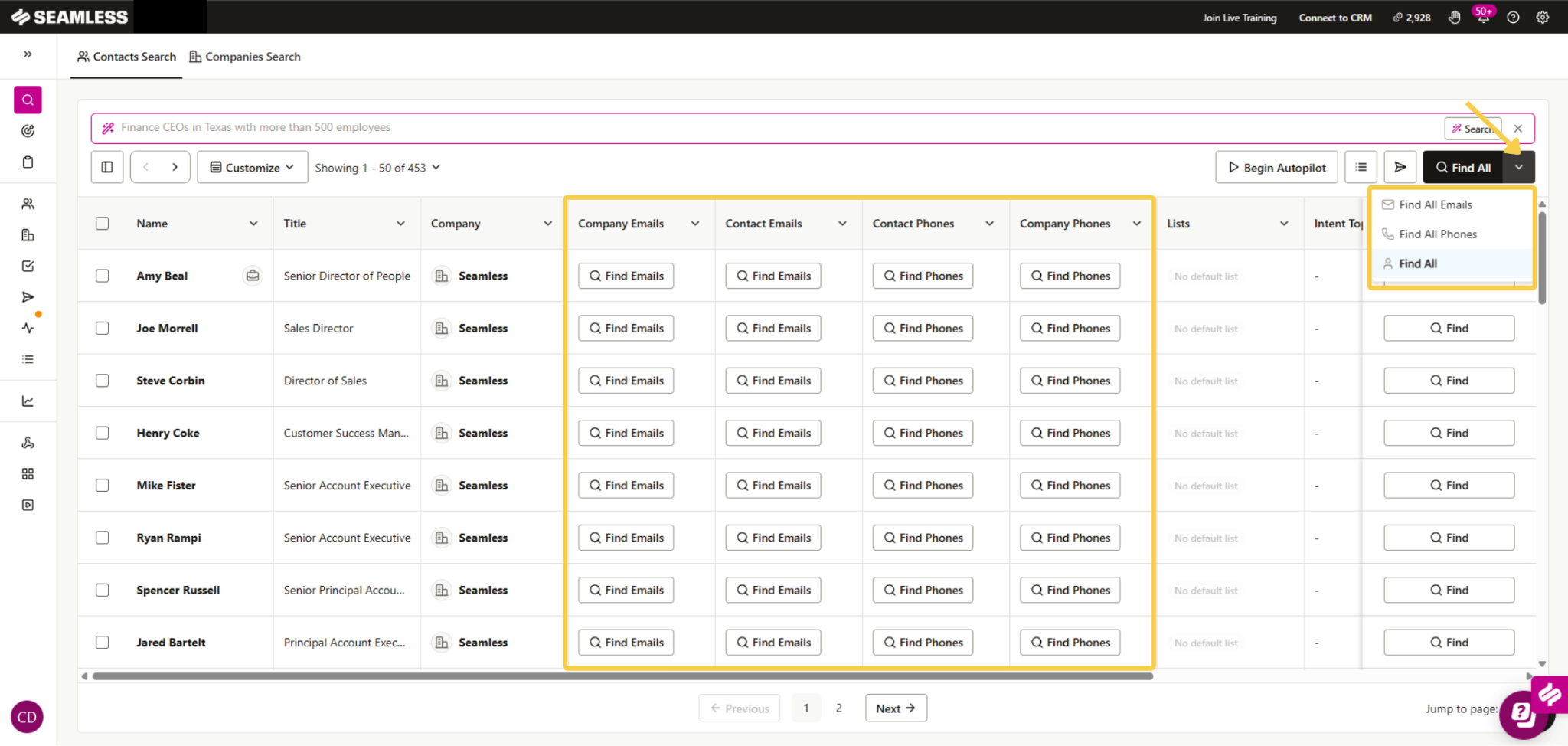
Previously, researching a contact returned all available data and charged a flat credit amount regardless of the data you needed.
With the new variable credit model, you choose upfront what type of contact data (emails, phone numbers, etc.) you want Seamless to find, and you are only charged for that data.
This means if you only need email addresses for your outreach, you are not spending credits on phone numbers you will never use, and vice versa.
Your Contact Data Options
You can choose from three contact data settings Here is what each one includes and what it costs. Please note that users on the legacy 1,000 credits per day plan will not have the option to choose their data preference. Their contact data settings are locked to Full Contact by default.
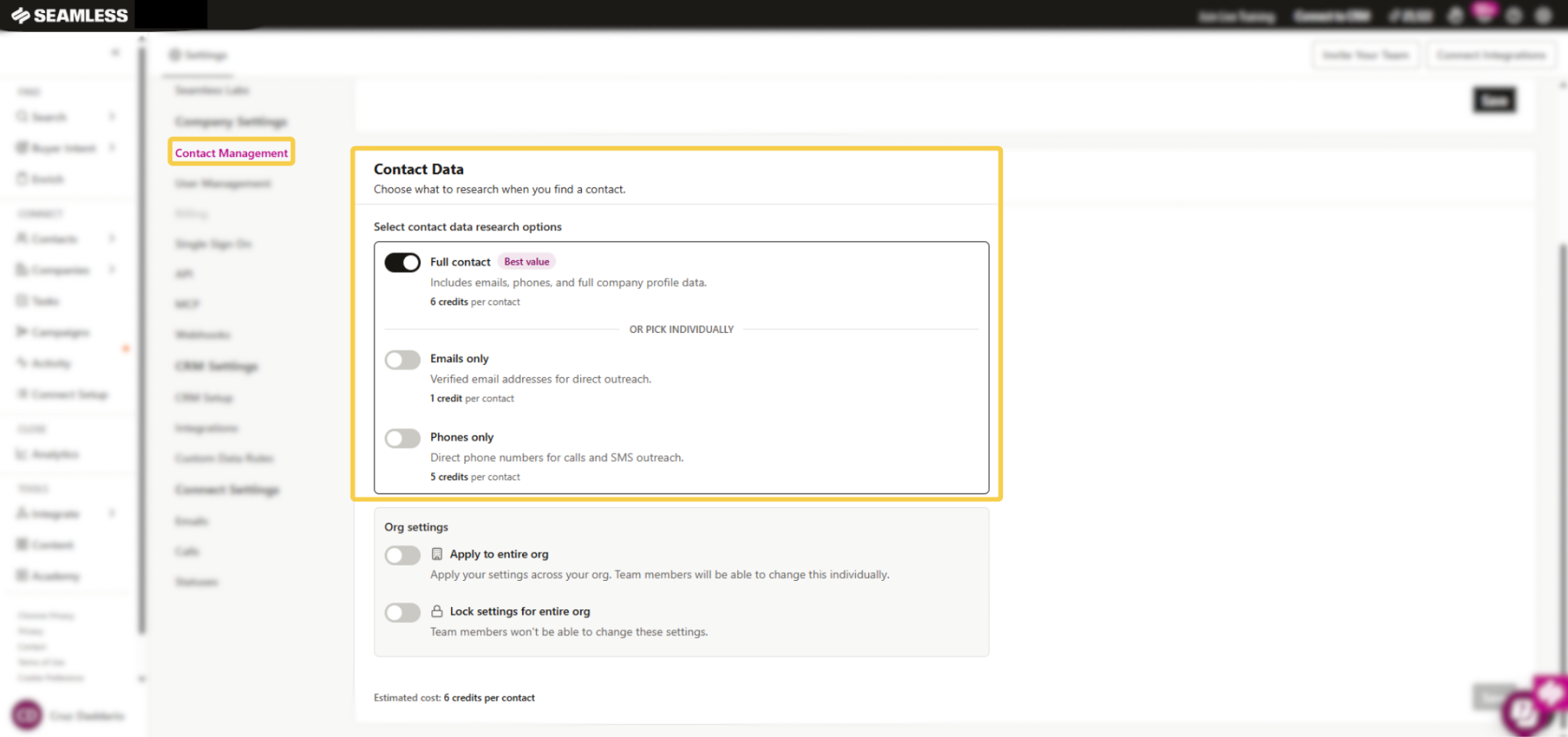
Full Contact — 6 credits per contact
Includes verified email addresses, phone numbers, and all available company profile data. This is the best value option if you need complete contact information for both email and phone outreach.
Emails Only — 1 credit per contact
Returns verified email addresses for direct outreach. Choose this option if you know your outreach will focus on email campaigns and you won’t need phone numbers.
Phones Only — 5 credits per contact
Returns phone numbers for calls and SMS outreach. Choose this option if your outreach is call-focused and you do not need email addresses.
Note: If you research a contact and only find an email or phone number rather than the full profile, you will still have the option to find the remaining data at any time. Simply go back to your Search page or visit My Contacts and click Find next to the contact to pull the additional information when you are ready.
Credit Increases With the New Model
As part of this update, all existing users are receiving a 6x increase to their credit balance. This adjustment is designed to ensure the workflow you’re used to doesn’t change despite our new credit model.
Legacy Daily-Refresh Plans
If your plan includes research credits that refresh every day, such as a legacy 1,000 credits per day plan, your daily credit balance is multiplied by 6. For example, 1,000 credits per day becomes 6,000 credits per day. This applies to paid and complimentary plans, and there is no minimum daily amount.
On these plans your contact data settings are locked to Full Contact, so you cannot change your data preference. Full Contact costs 6 credits per contact, so you can keep finding the same number of contacts as before. These plans are no longer available for new customers.
Your settings stay locked until you move to a newer package, even if your daily plan ends. A package change applies to your whole organization, including any child organizations. To explore your options, reach out to your Seamless account rep or contact our support team.
All Other Plans
Users on all current plans will also receive a 6x increase to their credit balance. You will have full flexibility to set and change your data preference at any time based on your outreach needs.
How to Set Your Data Preference
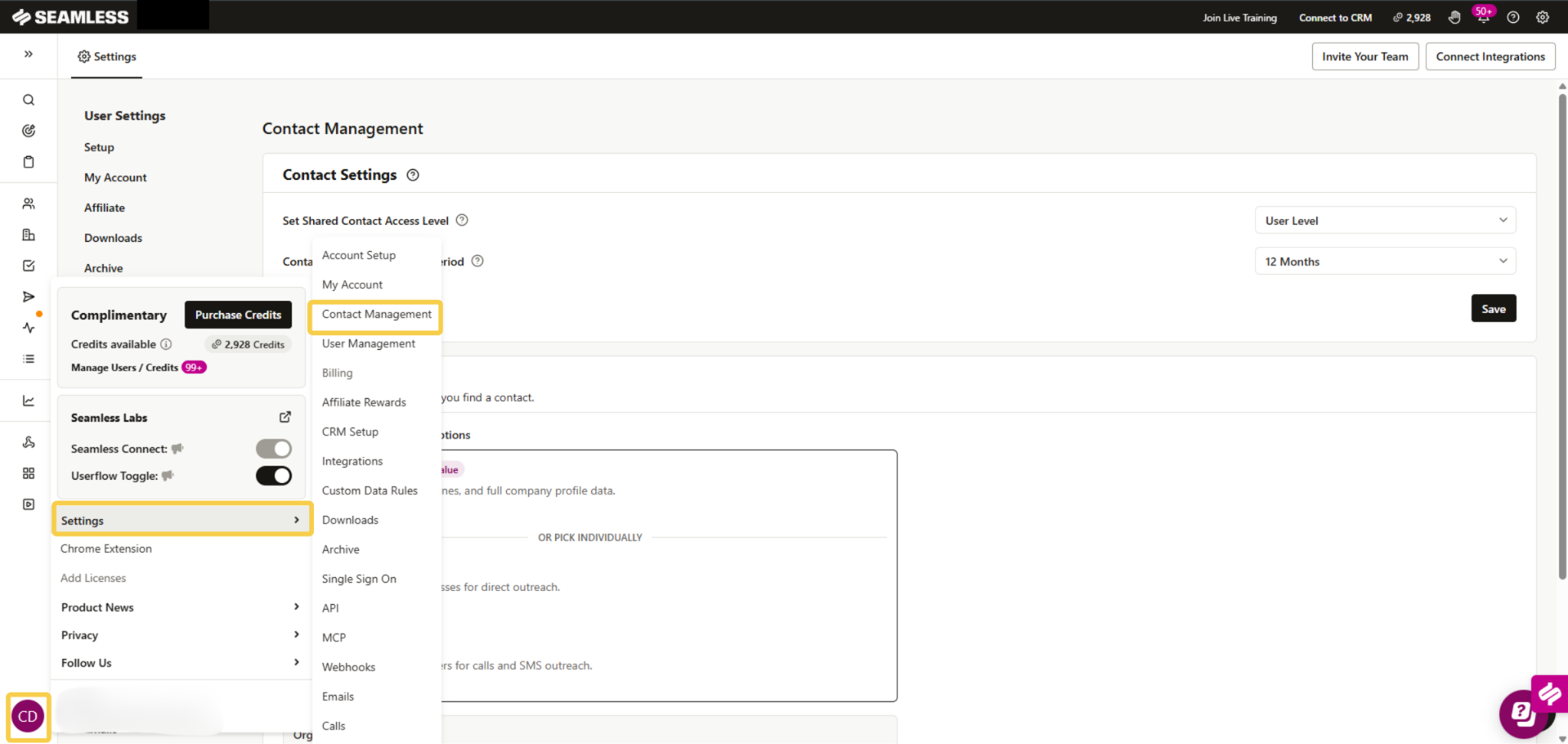
You can set your data preference from the Contact Management page in your account settings. Here is how to find it:
- Go to Settings in your Seamless account
- Under Company Settings, click Contact Management
- Scroll down to the Contact Data section
- Select your preferred contact data option — Full Contact, Emails, or Phones
- Click Save
You can return to this page and change your data preference at any time. The estimated credit cost per contact is displayed at the bottom of the section before you save, so you always know what to expect.
How Your Data Preference Affects the Platform
Your contact data setting controls what data Seamless returns and how many credits are charged across all of the following actions:
- Find — researching a single contact
- Find Selected — researching a group of selected contacts
- Find All — researching all contacts in a search page
- Autopilot — automated contact research runs
- Enrich — enriching contact records with updated data
For example, if your data preference is set to Emails Only, all of these actions will return email addresses only and charge 1 credit per contact.
If you switch to Full Contact, the same actions will return emails, phones, and company data, and charge 6 credits per contact.
Your data preference is applied consistently across the platform, so there are no surprises in how credits are spent.
Admin Controls — Locking Data Preferences
Account Owners and Admins have the ability to enforce a data preference across the entire organization. Individual users cannot change it on their own.
This is managed through the Lock settings for entire org toggle in the Contact Data section of Contact Management settings.
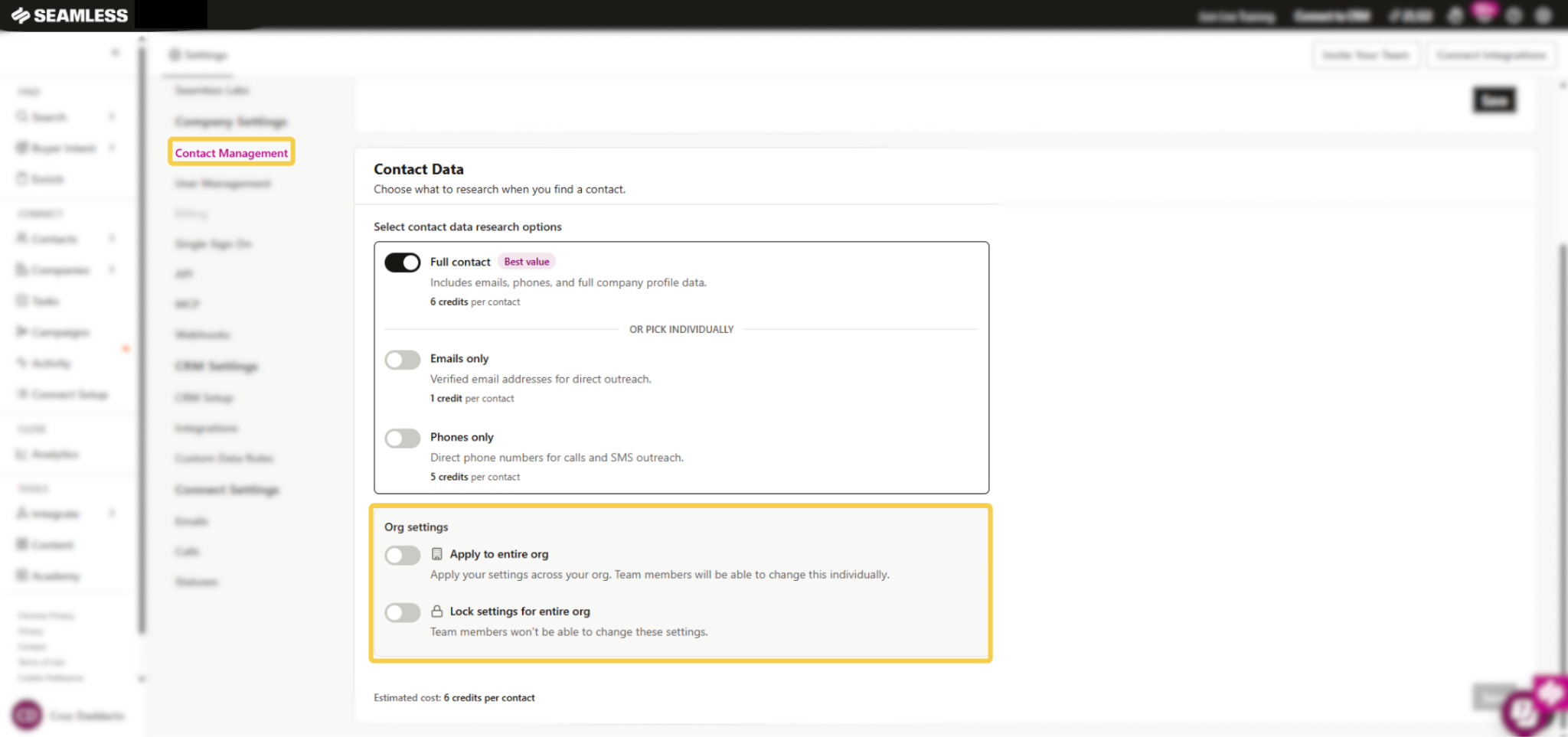
- Toggle On — The data preference selected by the Admin is locked and applied to all users in the organization. Users won’t be able to change their individual data settings.
- Toggle Off — Users have the freedom to go into their own settings and switch their data preference to whatever option best fits their workflow.
If your organization wants to standardize credit usage across the team, locking the data preference ensures everyone is working from the same settings and prevents unintended credit usage.
Turn Off Email or Phone Research for Your Whole Organization
Owners and Admins can also turn off one data type for everyone in the organization.
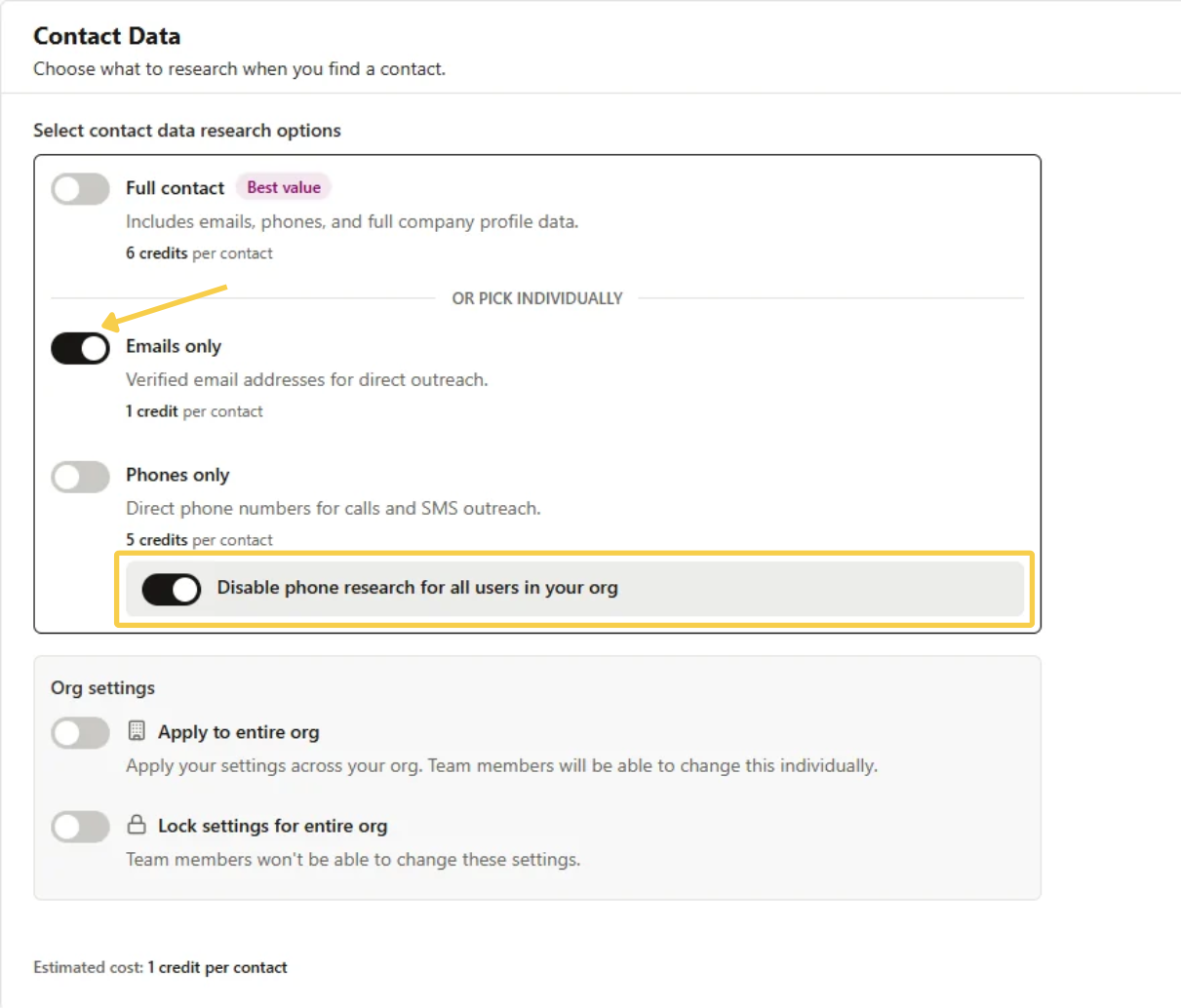
- If you select Emails only, a switch appears under Phones only: Disable phone research for all users in your org.
- If you select Phones only, a matching switch appears under Emails only: Disable email research for all users in your org.
When you turn the switch on and click Save, that data type is turned off for everyone. The matching Find options are hidden, and members see the setting disabled. This works on its own, so you do not need to lock settings for it to apply.
For example, if you never want your team spending credits on phone numbers, select Emails only, turn on Disable phone research for all users in your org, and save. Phone research stays off until you switch it back on.
How Credit Refunds Work
Seamless automatically refunds credits in certain situations. Here is how refunds work for each data type:
Email Refunds
You will receive a credit refund for email in two situations:
- No valid business email found: If you use credits to research a contact and Seamless does not find a valid business email, the email credit is refunded to your balance automatically. A personal email address does not count as a found email, so the credit comes back if a personal email is the only one returned.
- Bounced email in Connect: If an email sent through Connect bounces, Seamless will automatically check whether the credit spent on that email address should be returned. If it qualifies, the credit is added back to your balance without you needing to open a ticket or request it.
Please note that email refunds only apply to emails researched by Seamless and sent through Connect. Emails sent through a synced Gmail or Outlook account or through another tool do not qualify.
Phone Refunds
You will receive a credit refund for phone data if Seamless was unable to return a contact phone number for the contact. If only a company phone number is found, the phone credits are still refunded, because company phone numbers are included at no charge.
Phone credits are not refunded if a contact number was returned, regardless of whether that number was successfully reached.
Frequently Asked Questions
Q: Can I change my data preference at any time?
A: Yes. You can return to Settings → Contact Management at any time and update your data preference.
Changes take effect immediately and will apply to all future research actions.
If your admin has locked the data preference for your organization, you will not be able to change it individually.
Q: Will changing my data preference affect contacts I have already researched?
A: No. Changing your data preference only affects future research actions. Contacts that have already been researched will not be updated or re-charged.
Q: What happens if I am on the Full Contact setting but Seamless only finds an email and no phone?
A: It depends on your plan and the type of email.
If you can choose your data preference:
- A valid business email and no contact phone: the 5 phone credits are refunded and you pay 1 credit for the email.
- Only a personal email plus a contact phone: the 1 email credit is refunded and you pay 5 credits for the phone.
If your plan is locked to Full Contact:
- A valid business email and no phone: you pay the full 6 credits. There is no partial phone refund on these plans.
- Only a personal email, with or without a phone: all 6 credits are refunded.
Q: I only need emails for my outreach. Should I switch to “Emails Only”?
A: Base your data preferences on your workflow and outreach priorities.
As a best practice, choosing phones and emails helps ensure that you can reach a contact on their preferred channel.
Q: Why did my credit balance increase?
A: All users received a 6x increase to their credit balance as part of the rollout of the variable credit model. This increase is designed to ensure you can keep finding the same number of contacts you are used to, without any interruptions to your workflow.
Q: My plan has daily-refreshing credits. Why can’t I change my data preference?
A: Plans with credits that refresh every day are locked to the Full Contact setting. This includes the legacy 1,000 credits per day plan, and there is no minimum daily amount. Your daily credits were multiplied by 6 (for example, 1,000 became 6,000 per day), so you can keep finding the same number of contacts as before.
The setting stays locked until you move to a newer package, even if your daily plan ends. To explore your options, reach out to your Seamless account rep or contact our support team.
Q: Do credit refunds happen automatically or do I need to request them?
A: Refunds are processed automatically. You do not need to open a ticket or contact support. The credit will reappear in your balance after the system processes the refund.
If you believe a refund should have occurred and it has not appeared after some time, reach out to our support team with the contact name and approximate research date.
Q: Does my data preference apply to Autopilot and Enrich runs?
A: Yes. Your data preference applies to all research actions in the platform, including Autopilot, Enrich, Find, Find Selected, and Find All. Whatever you have set as your preference is what the platform will return and charge for across all of these features.
Q: What if I need both emails and phones for some contacts but only emails for others?
A: You can change your data preference at any time from Settings → Contact Management.
If your Admin has not locked the setting, you can switch between options as needed depending on your outreach strategy for a given list or campaign.
Q: Will I be charged if Seamless cannot find any data for a contact?
A: If Seamless cannot return the data type you selected, the credits for that data type are refunded automatically. For email, that means no valid business email was found. A personal email does not count. For phone, that means no contact number was found.
Tips for Getting the Most Out of the Variable Credit Model
- Match your data setting to your outreach channel. If you are running an email campaign, set your preference to “Emails Only” to preserve credits. If you are running a call blitz, switch to “Phones Only.”
- Use “Full Contact” for new prospect research. When building a list from scratch, “Full Contact” gives you the most complete picture of each contact and is the best value at 6 credits.
- Admins should review the org-wide setting before enforcing it. Make sure the data preference you choose reflects the primary outreach channel your team uses. Use Apply to entire org to set a default your team can still change, or Lock settings for entire org if everyone should stay on the same option.
- Check your estimated cost before saving. The Contact Data section shows an estimated credit cost per contact at the bottom of the page before you save, so you always know what to expect.