In our 2025 AI in Sales report, 70% of sales professionals said that AI tools helped them hit quota more consistently.
AI is transforming the way sales are done, but how do you find the right AI sales tool for your team? More importantly, what KPIs (key performance indicators) do you measure to figure out if the tool is a dud or not?
Of all the KPIs, “Time to ROI” is probably the clearest indicator of whether a tool is a success. But in many ways, the time it takes to start seeing wins with a contact data platform depends on your own sales cycle.
Setting up a Seamless account takes minutes. And you can build your first list during an afternoon if you want. But what follows is the part nobody controls: the weeks or maybe even months that it takes a buyer to reply, book, and sign.
That gap is why switching tools can feel slow, even when you have a world-class tool that helps you begin sales prospecting work day one.
We want to shrink that gap between your first day using Seamless and your first closed-won deal, which is why we created this 30-day plan. In this article, you’ll learn what to set up, when to do it, and which KPIs tell you by the end of the month whether the switch paid off.
TL;DR
- Day one — Create your account, connect your CRM, install the Chrome extension.
- Week one — Set your Total AI for filtering, build a list, export it.
- Weeks two and three — Run outreach and measure your connect rates against your rates before you started Seamless.
- Week four — Compare cost per verified contact and meetings held against your baseline.
The short answer: Thirty days is long enough to prove the data works and to price it against what you paid before. But a closed deal still depends on your sales cycle, not ours.
What does time to ROI mean when you switch data providers?
When you sign up for a data provider, time to ROI is the time it takes to start seeing results that cover what you spent on the tool.
Time to ROI runs on two clocks. One is setup, which you control. The other is your sales cycle, which you do not control.
With Seamless, as soon as you create your account and start using the platform, you’ll be surprised by everything you can automate.
You can use our AI Search to find any contacts or accounts anywhere in the world. It all just depends on the prompt you put together.
Build a list of 100s in a matter of minutes, and export to your CRM (we can also clean and enrich the old contact info in your CRM). Our AI then researches your list for you, qualifies your leads, and drafts outreach.
So with Seamless, our platform is more than just a data provider. This is an all-in-one platform where we help you find the right leads, connect with them, and close them.
Well before you close your first deal with Seamless, you’re already getting returns in time saved before you start driving revenue.
Salesforce found in a survey (2025) of 4,050 sales professionals across 22 countries that sellers only spend 40% of their time selling. With Seamless, you get back a lot of that selling time, and that’s one of the first returns you can measure.
The 30-day rollout, step by step
Buying Seamless is only the first step. The goal of your first 30 days should be to get the platform configured correctly, establish a clean workflow with your CRM, test your targeting and data quality, and then scale what is producing results.
The rollout below gives you five milestones to complete during your first month. Follow them in order: each step creates the foundation you need to measure and improve the next one.
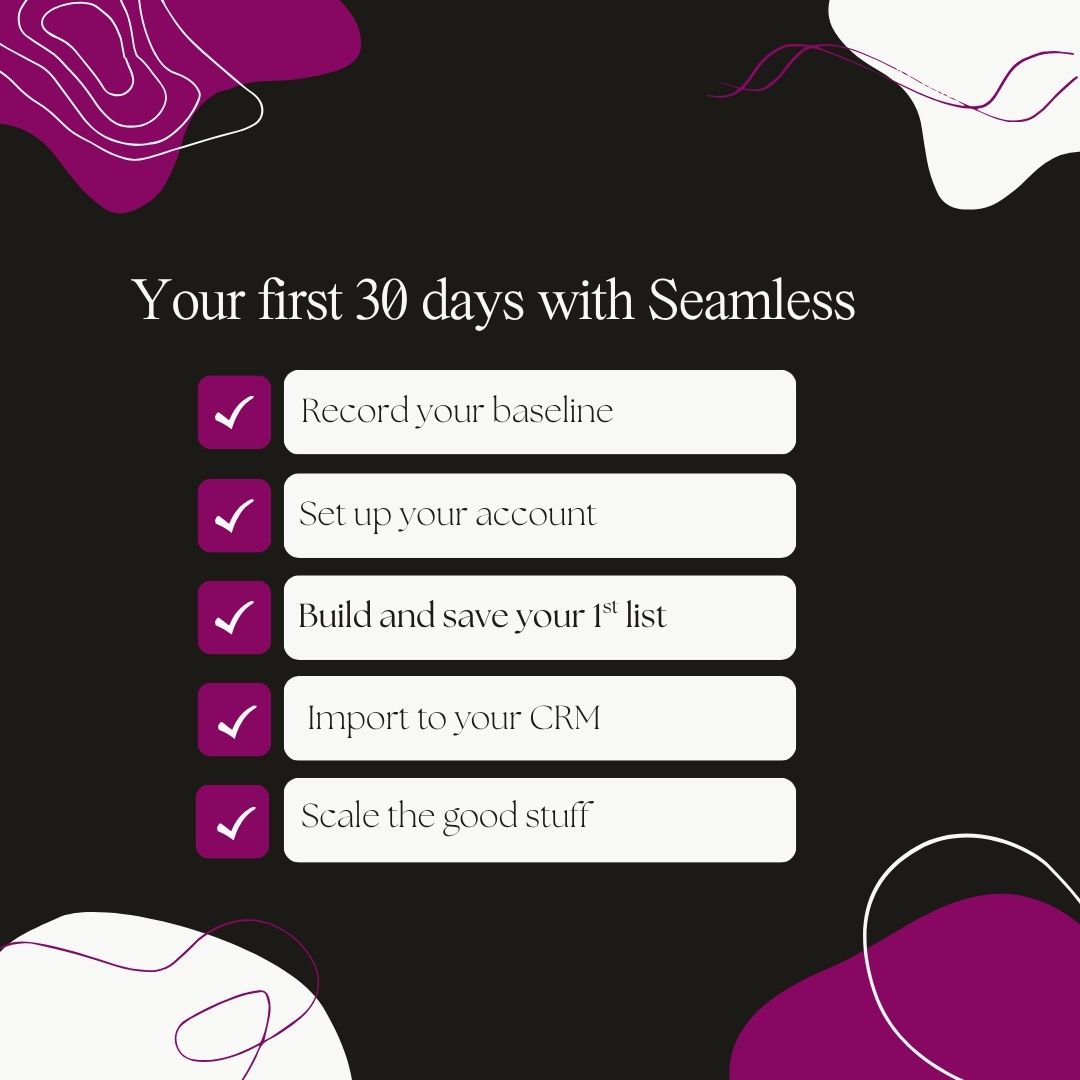
1. Record your baseline before you import anything
Complete by: Day 1
What to check: Pull the numbers directly from your CRM and reporting tools rather than relying on estimates.
How to do it: Before starting Seamless and changing your prospecting workflow, record four numbers from your current sales stack: contacts researched last month, cost per contact, connect rate, and meetings held. This will be your baseline that you measure your results with Seamless against to see if our platform is actually improving your prospecting efficiency.
2. Set up your account and connect your CRM
Complete by: Days 1-3
What to check: We have thousands of integrations, including all the most popular CRMs from Salesforce and HubSpot to Pipedrive and Outreach (Zapier for anything else). Authorize the connection before your first search, not after your first export.
How to do it: Create your account, invite your team from “User Management,” and assign licenses. Then connect your CRM under “Settings” and “Integrations,” and install the Chrome extension.
3. Build and save your first list
Complete by: Days 3-7
What to check: Build one list that targets one segment. If you are mapping a buying committee, filter by seniority and department with org charts instead of guessing who signs.
How to do it: Use our Contacts Search filters to narrow your search results down to leads matching your ICP (or include the firmographics that match your ICP in an AI Search prompt).
Be sure to filter by Total AI and prioritize higher-confidence records. Every email we return carries a Total AI score from zero to one hundred. Filter My Contacts to 70 and above before you export anything. Save the leads you like to a list.
4. Import into your CRM with the rules set first
Complete by: Days 7-14
What to check: Before you import your list, filter for duplicates, pay attention to field mappings, account matching, and any fields that may overwrite existing CRM data.
Your own CRM rules fire on top of ours — Salesforce duplicate rules, and HubSpot import behavior both still apply.
How to do it: Configure your match scores, field mappings, and overwrite behavior, then review those records manually inside your CRM.
5. Scale what worked with Autopilot
Complete by: Days 15-30
What to check: Once you’ve built and imported your first list and you have a better sense of which segments and searches give you the best lead quality and connect rates, scale it all with Autopilot. Autopilot skips anyone already in your “My Contacts,” so a second run does not bill you twice.
By Day 30, you should have a repeatable workflow: defined targeting, quality filters, clean CRM imports, and a proven search strategy you can confidently scale.
How to do it: Re-run the search that produced your best list, select "Begin Autopilot," and choose how many contacts you want Seamless to research.
Test it on 50 contacts. A free Seamless plan is 50 credits. Start for free.
Your 30-day checklist
If you want the 30-day rollout in a simpler format, use this checklist. It condenses the steps above into the key setup, testing, and scaling tasks your team should complete during the first month with Seamless.
Assign an owner to each item, and use it to make sure nothing gets skipped as you move from Day 1 setup to a repeatable prospecting workflow.
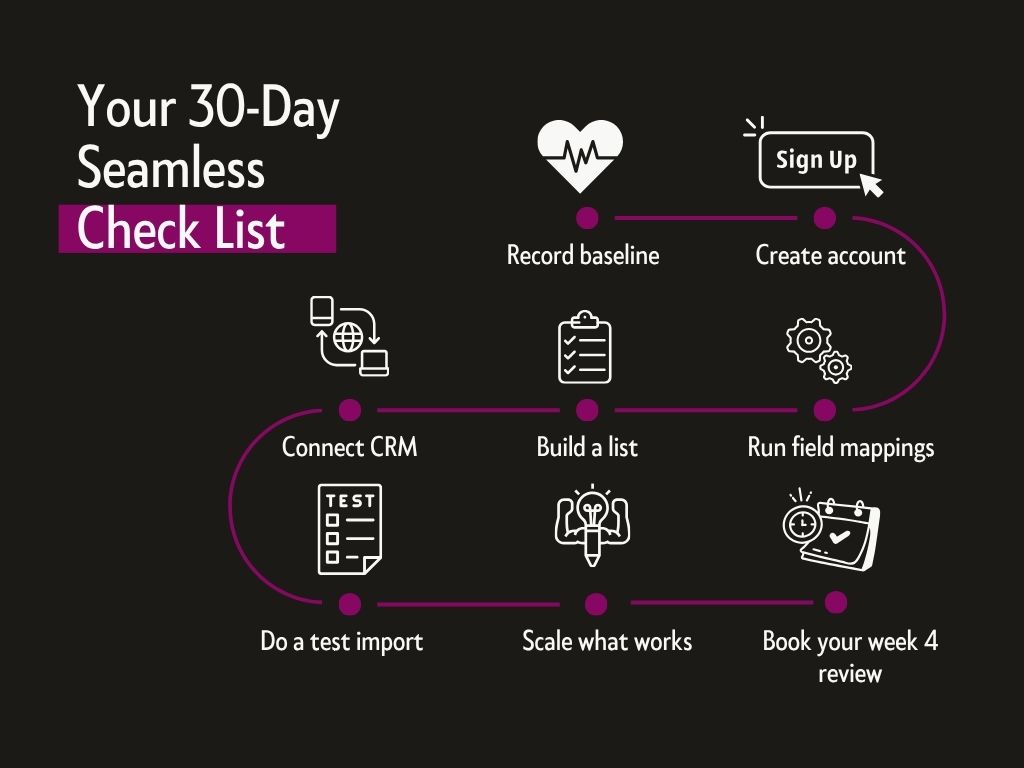
- Baseline recorded from the CRM: contacts researched, cost per contact, connect rate, meetings held.
- Account created, users invited, and licenses assigned in “User Management.”
- CRM connected and authorized under “Settings,” then “Integrations.”
- One saved list built against a single ICP segment.
- Match scores, override behavior, and field mappings configured ahead of the first import.
- A test import reviewed by hand before anything bulk.
- Autopilot pointed only at a search that already produced good contacts.
- Week four review booked in the calendar on day one.
Warning signs you’re off track
If no one on your team has run a search by the end of week one, that’s not a data problem; that might be an access problem. Make sure that you assigned licenses and that everyone can access Seamless.
If your team is running searches but exporting large lists without a clearly defined ICP, you may be burning credits without creating much pipeline. Narrow the search criteria first. Start with one target segment, review the contacts Seamless returns, and refine your filters before increasing volume.
If reps are repeatedly finding contacts but not adding them to your CRM or outreach workflow, you may have a process problem. Seamless should fit into the systems your team already uses. Make sure your CRM integration, field mappings, and export process are configured so reps can move from research to outreach without unnecessary manual work.
If the data looks right in Seamless but wrong after it reaches your CRM, stop scaling imports until you check your mappings and override settings. A small test import can catch issues such as data landing in the wrong fields, existing values being overwritten, or duplicate records being created.
If reps are spending too much time manually reviewing every contact, revisit your search criteria and use filters to improve the quality of the list before export. Remember, your goal with using Seamless shouldn’t just be to find more contacts. You want to find quality contacts that fit your ideal buyer.
If your team has exported thousands of contacts but cannot tell you whether connect rates, meetings, or pipeline have improved, you may have an attribution problem. Compare performance against the baseline you recorded before rollout. Track metrics such as contacts researched, cost per contact, connect rate, meetings held, and pipeline created.
And if usage drops sharply after the first couple of weeks, it might not be the platform. Look at adoption first. Are reps logging in? Are they using saved searches? Are they finding the right accounts and contacts? A week-four review with a rep can help you identify whether the issue is access, training, targeting, workflow configuration, or actual data quality before you change your strategy.
How to measure whether the switch to Seamless paid off
More contacts, more credits, or more activity are not proof of ROI on their own. The real question is whether your team can reach the right people more efficiently and turn those contacts into conversations and meetings.
You also do not need to wait six months to know whether Seamless is working. Start with the baseline you recorded before the rollout, then compare performance across three metrics that should begin moving within your first few weeks.

Cost per verified contact
What to measure: Credits consumed divided by contacts that cleared your Total AI threshold and reached a real inbox.
What good looks like: Lower than your baseline.
Connect rate on direct dials
What to measure: Answered calls divided by dials, on the same segment your reps called before the switch.
What good looks like: Movement inside three weeks. Phone data is straightforward. You either connect with a buyer or you don’t.
Meetings held per hundred contacts
What to measure: Meetings actually held, not meetings booked, against contacts worked from the new list.
What good looks like: Meetings held takes the longest to achieve but it’s a clear indicator of the ROI you are driving.
It could take a month to start seeing revenue with Seamless, but the wait is well worth it. Customers like Justin Stephens of Prospecting Done For You generated $1M in sales within five to six months using our platform.
"When reporting to VPs, CEOs, when I say I'm going to get ahold of somebody with Seamless, I could do that." - Anthony Walsh, Head of Business Development & Partnerships @Arena
The real goal of your first 30 days
Now that we’ve gone over all that you should do during your first 30 days using Seamless, here’s the mistake to avoid: don’t judge Seamless by how many contacts you can pull in a month. Judge it by whether or not your prospecting improved.
It’s easy to confuse activity with ROI. Ten thousand new contacts in your CRM look impressive. And thousands of dials look productive. But none of that matters if your reps still aren’t reaching the right people.
When you sign up for Seamless, by day 30, you should be able to answer a few important questions:

Are we finding qualified contacts for less than we were before? Are more prospects actually answering our calls? Are those contacts turning into more held meetings?
If the answer to these questions is yes, the switch is already working.
The closed-won revenue will follow on the timeline of your sales cycle. Your job during the first month is to just make sure the inputs are moving in the right direction.
That means resisting the urge to scale everything immediately.
Start with one ICP. Find the searches that produce your best contacts. Measure the results. Fix what isn’t working, and automate what is.
Because the fastest way to completely blow a great sales intelligence platform is to automate all the wrong things. The best Seamless workflow does the opposite. Find the right people. Reach more of them. Prove what works. Then scale it.
That is what your first 30 days are really for.
Frequently asked questions about your first 30 days on Seamless
How long does it take to see ROI from Seamless?
How long it takes to see ROI from Seamless depends on your sales cycle. Data quality typically shows up in connect rates within a month. Cost per verified contact is comparable at the end of month one. Closed revenue follows whenever your deals normally close.
How do you set up Seamless for a new sales team?
To set up Seamless for a new sales team, create the account, invite users from “User Management,” and assign each one a license. Then connect your CRM under “Settings and Integrations,” and install the Chrome extension. You can create an account and get started within minutes.
What is a good Total AI score to export on?
A good Total AI score to export on is 70 or above.
Scores in the fifties and sixties deserve a second look before sending.
Below that, your email will likely reach the address you want.
What should you measure in your first 30 days on Seamless?
In your first 30 days on Seamless, you should measure three numbers: cost per verified contact, connect rate on direct dials, and meetings held per hundred contacts worked. Compare each one against the baseline you recorded before the first import. Industry averages are not the test here; your own previous numbers are.
Does Seamless work with your existing CRM?
Seamless works with your existing CRM through twelve native integrations, including Salesforce, HubSpot, Microsoft Dynamics, Zoho, Pipedrive, Salesloft, Outreach, and Greenhouse. Anything outside that list connects through Zapier or our API. You authorize the connection once, under “Settings” and then “Integrations,” and imports run from there afterward.
Read similar stories
More from our data quality coverage: