How to Enrich Salesforce Leads With Verified Contact Data
Seamless Team
May 21, 2026
Getting verified contact data into Salesforce is not hard when you have a trusted source.
Yes, you can enrich Salesforce leads with verified contact data by connecting Salesforce to a trusted B2B data provider.
You just to need to match existing lead records to accurate person and company profiles to verify emails and phone numbers, then mapping enriched fields to Salesforce, and automating updates through an integration, API, Salesforce Flow, or controlled batch process will give you enrich automation that exceeds current levels.
Why?
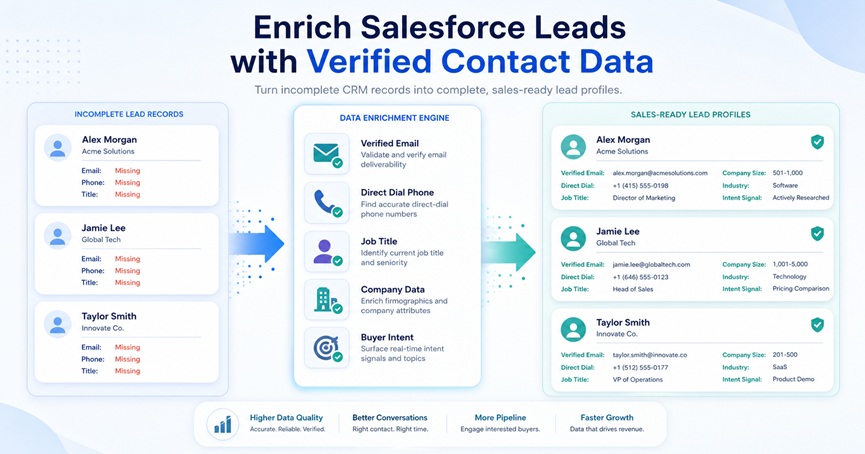
The purpose of Salesforce lead enrichment is to turn incomplete CRM records into sales-ready profiles. A basic Lead record may only include a name, company, and lead source.
After enrichment, that same record can include a verified business email, direct-dial phone number, current job title, department, seniority, company website, industry, employee count, location, and buying signals.
This matters because poor CRM data slows down revenue teams. Reps waste time researching prospects, emails bounce, phone numbers fail, lead routing becomes unreliable, and marketing campaigns become harder to segment.
With a repeatable enrichment workflow, sales and RevOps teams can improve data quality, prioritize the right leads faster, and give reps better information before outreach.
For teams that need verified B2B contact data, Seamless helps sales teams find emails, phone numbers, company information, and sales intelligence for prospecting and CRM enrichment workflows.
What Is Salesforce Lead Enrichment?
Salesforce lead enrichment is the process of adding, correcting, validating, and standardizing information on Salesforce Lead records using external data sources and internal CRM rules.
Enrichment in Salesforce can include adding missing business emails, direct dials, mobile numbers, job titles, company domains, industries, employee counts, revenue ranges, locations, and buyer intent signals.
It can also include updating outdated records, identifying duplicate Leads or Contacts, and adding verification metadata so your team knows when a record was last enriched and how reliable the data is.
Lead enrichment is different from a simple data import. A data import adds records to Salesforce, while data cleansing fixes formatting or incorrect values.
Data enrichment improves the record by adding missing or more useful information. Data verification confirms whether that information is usable, such as whether an email is deliverable or a phone number is valid.
The strongest enrichment programs are not one-time uploads. They are ongoing data quality workflows that help Salesforce stay useful as people change jobs, companies grow, and contact information decays.
What Contact Data Should You Enrich in Salesforce?
The best Salesforce enrichment strategy focuses on the fields that improve sales execution, lead routing, segmentation, and reporting. You do not need to enrich every possible field. You need the fields that help your team identify, qualify, and contact the right prospects.
At the person level, the most valuable fields usually include business email, email verification status, phone number, direct dial mobile phone where available and compliant, job title, department, seniority, professional profile URL, location, and time zone. These fields help reps understand who the lead is and how to reach them.
At the company level, useful enrichment fields include company name, website, domain, industry, employee count, revenue range, headquarters location, company phone number, company description, and parent or subsidiary information. These fields are especially important if your team routes leads by territory, company size, industry, or segment.
Sales intelligence and buyer intent data can add another layer of prioritization. Intent topics, hiring trends, funding events, technology signals, leadership changes, or company growth indicators can help sales teams understand whether a prospect may be worth contacting now.
A strong enriched record should answer three questions: who is this person, is this company a good fit, and is there a timely reason to reach out?
Why Verified Contact Data Matters in Salesforce
Salesforce is only as useful as the data inside it. If Lead records are incomplete or inaccurate, every downstream workflow becomes less reliable.
Verified contact data helps sales teams spend less time researching and more time selling. It can reduce wasted outreach by improving email deliverability, lower bounce risk by flagging invalid or risky addresses, and improve call productivity by adding direct-dial or phone data where available.
That's where Seamless can help companies by enriching their existing CRM with qualified and reliable contact data.
Accurate industry, location, employee count, seniority, and department data help Salesforce assignment rules route leads correctly. Everything works better together.
Lead scoring becomes more useful when fit data is complete. Marketing segmentation improves when fields are standardized. Reporting becomes more trustworthy when the underlying CRM data is consistent.
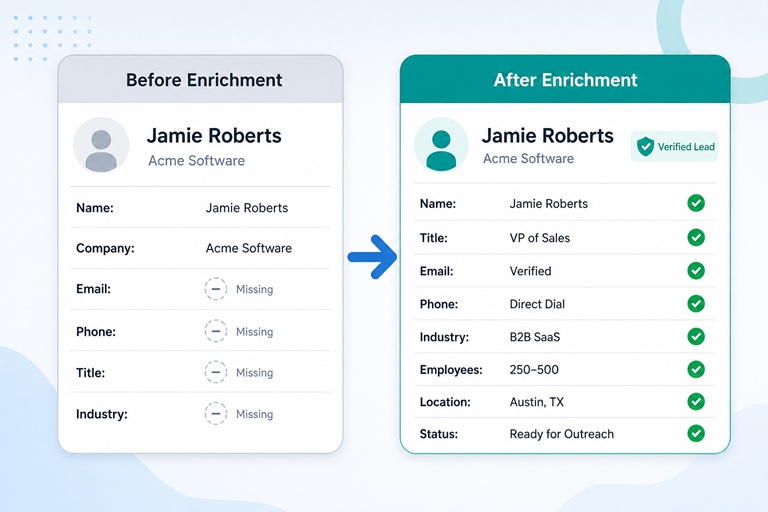
For example, a lead with only “Jamie Roberts, Acme Software” is difficult to prioritize. After enrichment, the record may show that Jamie is a VP of Sales at a 300-person B2B SaaS company in Austin with a verified business email, direct dial, and relevant intent signals. That record is now useful for routing, scoring, personalization, and outreach.
How to Enrich Salesforce Leads With Verified Contact Data
A successful Salesforce enrichment workflow should be structured, governed, and tested before it is automated. The 8-step process below gives RevOps, Salesforce admins, and sales leaders a practical way to enrich Lead records without creating data quality problems.
Step 1: Audit Your Existing Salesforce Lead Data
Start by identifying where your Salesforce Lead data is incomplete or unreliable. Create reports for Leads missing email addresses, phone numbers, job titles, company names, company websites, industry, employee count, or location. You should also review bounced emails, duplicate email addresses, inactive owners, stale Leads, and records that have not been contacted recently.
This audit helps you decide where enrichment will have the biggest impact. If inbound demo leads often lack phone numbers, phone enrichment should be a priority. If lead routing depends on company size or territory, then employee count and location should be prioritized. If outbound campaigns suffer from high bounce rates, verified email enrichment should come first.
Before enrichment begins, add a few custom fields to support governance. Useful fields include Last Enriched Date, Enrichment Source, Email Verification Status, Phone Verification Status, Data Confidence Score, Last Verified Date, and Enrichment Error Reason. These fields make it easier to track data freshness and troubleshoot enrichment results.
Step 2: Define the Fields You Want to Enrich
The next step is to decide exactly which Salesforce fields should be enriched and how each one should be used. Start with the fields that directly affect outreach, routing, scoring, and segmentation.
A practical field priority is business email, email verification status, direct dial or phone number, job title, company name, company domain, industry, employee count, location, department, seniority, revenue range, and intent data.
Use a field mapping plan before updating records. This prevents confusion and protects important CRM data.
Salesforce Field
Enriched Data
Purpose
Email
Verified business email
Enables outreach and matching
Phone
Direct dial or company phone
Supports call activity
MobilePhone
Mobile number, where available and compliant
Helps with high-priority outreach
Title
Current job title
Improves persona targeting
Company
Current company name
Supports qualification
Website
Company website or domain
Helps with account matching
Industry
Company industry
Supports segmentation and routing
NumberOfEmployees
Employee count
Helps assess ICP fit
AnnualRevenue
Revenue range
Supports prioritization
Enrichment Source
Data provider name
Supports governance
Last Enriched Date
Date of enrichment
Shows data freshness
Email Verification Status
Verified, risky, invalid, or unknown
Protects deliverability
One important best practice is to preserve the original Lead Source. Do not overwrite Lead Source with the enrichment provider name. Lead Source should continue to reflect how the lead entered your funnel, such as demo request, webinar, paid search, referral, or content download. Use a separate Enrichment Source field to track where appended data came from.
Step 3: Choose a Trusted Contact Data Source
Salesforce stores your CRM data, but it does not automatically know whether every email, phone number, title, or company record is accurate. To enrich Leads, you need a reliable B2B data source.
A strong enrichment provider should offer verified business emails, phone numbers or direct dials, company matching, firmographic data, Salesforce integration or API access, field mapping controls, duplicate prevention, compliance support, and clear enrichment metadata.
You should also evaluate coverage in your target market. A provider may have strong data for certain regions, industries, or company sizes but weaker coverage elsewhere. Run a small test sample before committing to a full database update.
Platforms like Seamless help sales and go-to-market teams find B2B contacts, emails, phone numbers, company data, and sales intelligence that can support CRM enrichment and prospecting workflows.
Step 4: Connect the Enrichment Source to Salesforce
There are several ways to connect enrichment data to Salesforce. The right option depends on your data volume, technical resources, and governance requirements.
A native Salesforce integration is usually the simplest option for sales and RevOps teams. In this workflow, you connect the provider to Salesforce, authenticate access, choose which objects to enrich, map fields, set overwrite rules, and test the workflow on a small sample before scaling.
An AppExchange app may also be available, depending on the provider. This can add enrichment buttons, page components, or automated enrichment actions inside Salesforce.
API-based enrichment gives technical teams more control. A new Lead can trigger Salesforce Flow, middleware, or a backend process that sends lead data to an enrichment API. The API returns matched contact and company data, and Salesforce updates approved fields based on confidence rules.
CSV enrichment can work for one-time cleanup projects, but it is less ideal for ongoing workflows. Exporting Leads, enriching them externally, and reimporting through Data Loader creates more room for manual error. For recurring enrichment, an integration or API workflow is usually more reliable.
Step 5: Set Clear Overwrite and Matching Rules
Field mapping tells Salesforce where enriched data should go. Overwrite rules tell Salesforce when that data should replace what already exists.
A safe approach is to update blank fields automatically, but handle conflicts more carefully. If a Salesforce field is empty and the provider returns a verified value, populate it. If an existing email has bounced and the provider returns a verified business email, update it. If a sales rep recently updated a title or phone number, avoid overwriting it automatically unless the new data has higher confidence and your governance rules allow it.
Conflicting company names should be handled carefully. If the company name differs but the domain matches, the record may be correct but formatted differently. If the domain differs, the lead may have changed companies or the match may be wrong. Those cases should be reviewed before automatic updates.
Deduplication should happen before major updates. Check whether the person already exists as a Lead, Contact, converted Lead, or Contact under an existing Account. Use matching signals such as email address, company domain, first and last name, phone number, professional profile URL, and Account ID.
This step protects Salesforce from duplicate records, bad overwrites, and inaccurate routing.
Step 6: Verify Emails and Phone Numbers Before Outreach
Adding contact data is only valuable if the data is usable. Email verification should check whether the address is properly formatted, whether the domain exists, whether mail servers are configured, and whether the mailbox appears deliverable. It should also identify risky categories such as catch-all domains, disposable emails, role-based addresses, invalid addresses, and unknown results.
Use clear Salesforce statuses such as Verified, Likely Valid, Risky, Catch-All, Invalid, and Unknown. These statuses help sales and marketing teams decide which leads can safely enter email sequences.
Phone data should also be treated carefully. A direct dial is usually more useful than a main company switchboard, but phone outreach must follow applicable laws, internal policies, opt-outs, and regional requirements. Store Phone Verification Status and Last Verified Date when possible so reps understand how current the number is.
Verified data protects outreach quality. Unverified data can increase bounce rates, waste rep time, and create a false sense of pipeline readiness.
Step 7: Automate Enrichment at the Right Moments
Once your field mapping, verification rules, and deduplication logic are tested, you can automate enrichment. The best automation triggers are tied to moments when better data improves speed or decision-making.
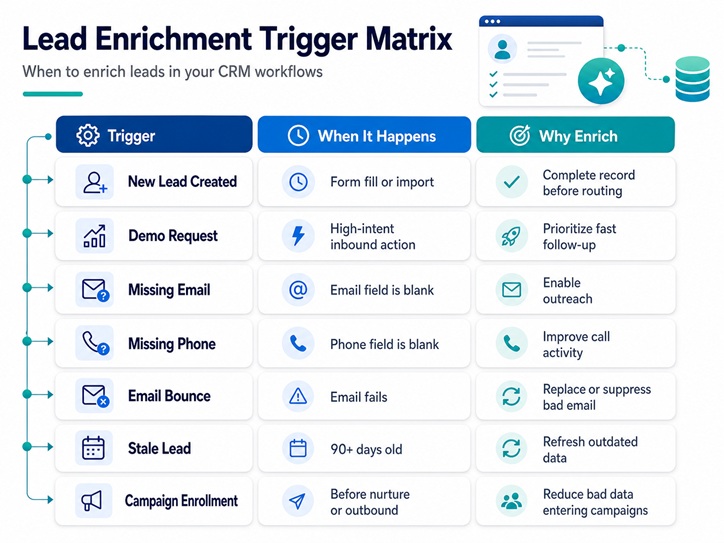
Common triggers include new Lead creation, demo requests, webinar registrations, event imports, missing email or phone fields, lead score thresholds, SDR assignment, stale Leads, email bounces, or campaign enrollment.
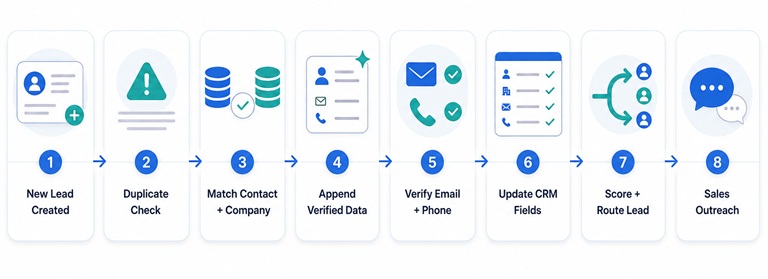
For example, when a demo request creates a new Salesforce Lead, enrichment can run immediately. Salesforce checks for duplicates, matches the person and company, appends verified email and phone data, adds job title and company size, updates verification metadata, recalculates lead score, and routes the lead to the correct rep. The SDR receives a more complete record before the first touch.
You can also refresh stale Leads on a set schedule. For open Leads that have not been updated in 90 days, enrichment can check whether the person has changed roles, whether the email is still valid, and whether company data has changed. Invalid or low-confidence records can be flagged instead of automatically pushed back into outreach.
Automation should be rolled out gradually. Start with a small segment, review the results, adjust the rules, and then scale.
Step 8: Measure the Impact of Salesforce Lead Enrichment
Lead enrichment should improve measurable sales and marketing outcomes. Track performance before and after enrichment so you can prove whether the workflow is working.
The most useful metrics include CRM completeness, email bounce rate, reply rate, call connect rate, speed to lead, lead routing accuracy, duplicate rate, meeting creation, lead-to-opportunity conversion rate, and pipeline generated. You should also monitor data decay by tracking how often enriched records become outdated.
The impact will vary based on your market, data provider, sales process, and outreach strategy. However, a well-managed enrichment workflow should make Salesforce cleaner, reduce wasted activity, improve routing accuracy, and help reps engage prospects with more confidence.
Example Salesforce Lead Enrichment Workflow
Here is a simple workflow for enriching inbound demo leads before sales assignment.
A prospect submits a demo request form, and Salesforce creates a new Lead. Salesforce checks whether the person already exists as a Lead or Contact. The enrichment provider then matches the record to available person and company data. If the match is strong, Salesforce appends verified contact data such as business email, direct dial, job title, department, seniority, company website, industry, employee count, and location.
Next, Salesforce updates enrichment metadata, including Last Enriched Date, Enrichment Source, Email Verification Status, and Phone Verification Status. Lead scoring runs again using the new fit data. Assignment rules route the Lead to the correct SDR or AE. If the match confidence is low, the record goes to a review queue instead of being automatically updated.
This workflow gives sales teams cleaner data before outreach while reducing the risk of bad updates.
Common Mistakes to Avoid
The most common mistake is enriching Salesforce without deduplication. If the same person already exists as a Contact or converted Lead, enrichment can create duplicate records and confuse ownership.
Another mistake is overwriting good CRM data. Customer-provided information or recently updated rep-entered data should not be replaced automatically without confidence rules.
Teams also create problems when they treat every appended email as verified. Email status should be stored in Salesforce, and risky or invalid emails should be excluded from automated campaigns.
Field standardization is another major issue. If industry, department, seniority, and region values are inconsistent, enrichment may add more data without improving routing or reporting.
Finally, many teams enrich once and stop. Contact data decays over time. People change jobs, companies rebrand, and phone numbers change. Salesforce enrichment should be treated as an ongoing data quality process, not a one-time cleanup project.
Compliance Considerations for Lead Enrichment
Salesforce lead enrichment should be handled in a way that respects privacy, consent, opt-outs, and applicable regional regulations. Teams should use reputable data providers, maintain suppression lists, honor unsubscribe and opt-out requests, and avoid contacting people who should not be contacted.
It is also important to store enrichment source and last enriched date so your team can understand where data came from and when it was updated. Phone outreach should follow applicable do-not-call rules and internal compliance policies.
This article is for informational purposes only and is not legal advice. Work with your legal or compliance team to confirm that your enrichment and outreach practices meet the requirements that apply to your business.
How Seamless Can Help Enrich Salesforce Leads
Seamless helps sales and go-to-market teams find verified B2B contact data, including emails, phone numbers, company information, and sales intelligence. For Salesforce users, this can support workflows such as filling missing email fields, finding phone numbers, appending job titles, improving company data, building prospect lists, and reducing manual research for SDRs and AEs.
With better contact and company data, sales teams can spend less time searching for information and more time engaging the right prospects.
FAQs About Enriching Salesforce Leads
What is Salesforce lead enrichment?
Salesforce lead enrichment is the process of adding, validating, and updating Lead records with useful contact and company data, such as verified emails, phone numbers, job titles, company domains, industries, employee counts, and buyer signals.
How do I enrich leads in Salesforce?
You enrich leads in Salesforce by connecting a trusted B2B data provider like Seamless, mapping enriched data to Salesforce Lead fields, verifying emails and phone numbers, setting overwrite rules, checking for duplicates, and automating updates through an integration, API, Salesforce Flow, or batch process.
Can Salesforce enrich lead data automatically?
Salesforce can support automated enrichment when it is connected to an enrichment provider such as the Seamless API, AppExchange app, API, or workflow automation. Salesforce manages the records and logic, while the enrichment source provides updated contact and company data.
What fields should I enrich first?
Start with business email, email verification status, phone number, job title, company name, company domain, industry, employee count, location, department, seniority, and revenue range. These fields usually have the biggest impact on outreach, routing, scoring, and segmentation.
Should enrichment overwrite existing Salesforce data?
Not always. Enrichment should update blank fields automatically, but conflicting values should follow clear overwrite rules. If existing data is recent, customer-provided, or rep-verified, it should not be overwritten without a strong reason.
How often should Salesforce leads be enriched?
High-intent leads should be enriched in real time or before sales outreach. Older or inactive Leads can be refreshed every 60 to 180 days, depending on your sales cycle, data decay rate, and market.
Takeaway
The best Salesforce enrichment workflows are not simple data appends. They are ongoing RevOps processes that keep CRM records accurate, help sales teams move faster, and improve the quality of every lead handoff.
If your team is ready to improve Salesforce lead quality, Seamless can help you find verified contact data and sales intelligence for more effective prospecting. Talk to a rep today for a demo or sign-up now to get 50 free credits.
Sales intelligence and prospecting expert with years of experience to help sales teams grow and hit quota. Voted one of the top startups in America and rated as the highest software in Customer Satisfaction from G2 best software awards in 2025. Join our Reddit community for more product updates and sales tips. https://www.reddit.com/r/Seamless_AI/