Autopilot
Autopilot provides the easiest and most efficient way to automate your lead generation. Simply set your search criteria, trigger autopilot, and let Seamless go to work researching your entire list in real-time.
Unleashing the Power of Autopilot
Autopilot automatically builds large, targeted sales and marketing lists for you, 1,000s to 100,000s of contacts in minutes. Simply enter your criteria and let the AI handle the list-building, saving hours of manual work.
Each contact researched with Autopilot will use one credit. For example, if Autopilot researches 2,500 contacts it will use 2,500 credits.
Starting an Autopilot search
Learn the ins and outs of using Autopilot, paving the way for enhanced efficiency and seamless workflow optimization.
1. Navigate to Contact Search
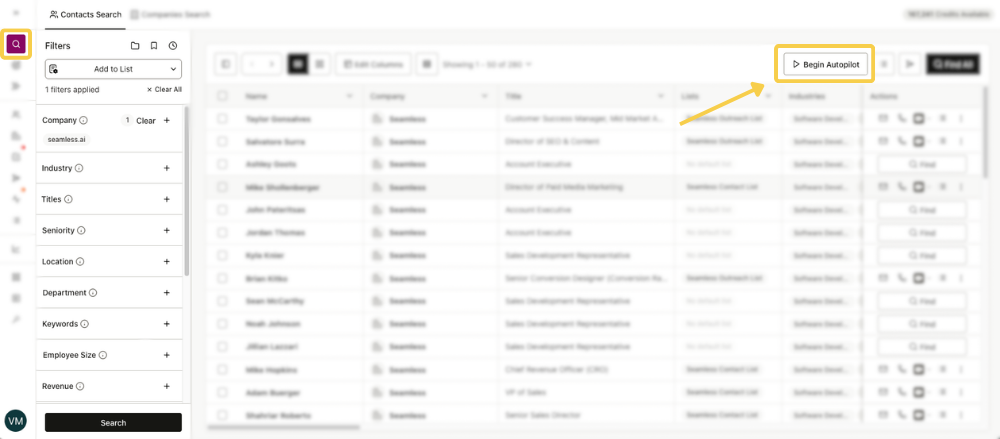
2. Start a Contacts Search as you typically do by using filters targeting your Ideal Customer Profile (ICP) and click “Search” to populate results of your search.
3. To start researching with Autopilot, click “Begin Autopilot” in the top right corner.
4. In the Autopilot setup screen, complete the following:
- Name your search. This will be the name of the Autopilot search you will look for when you want to access the results.
- Choose the number of contacts you want researched from the search results.
For example, you may want 4,000 of the 10,500 contacts in the results researched.
One Universal Credit is required per contact researched. See the number available Universal Credits in the top left credit box.
- To save the researched contacts to a list, select “Add to List.” Create a new list or choose from a previously created list to save the contacts to.
- If you want to automatically import researched contacts to your connected CRM(s), enable the last box. If you have multiple CRMs connected and you only want to import contacts to one of the CRMs, leave the box unchecked. Then you can import the contacts to the desired CRM later from the My Contacts or list view.
.png)
5. Click Begin Autopilot. Seamless will begin automatically researching your contact results starting on the first page. During this process Seamless will conduct real-time research and validate contact and company information for the selected list.
6. As your list is processing, you can check the research progress from the Autopilot tab in My Contacts. Additionally, you can pause or cancel your list anytime during research, and only the contacts that have been researched will be saved in your list.
After an Autopilot list has been researched, you can view and manage contact in the My Contacts page as typical researched contacts. Or, you can download the specific list through the Autopilot List tab.
.png)
Autopilot Benefits and Use Cases
Automate Large-Scale List-Building: Instantly create sales and marketing lists with thousands, even hundreds of thousands, of contacts in minutes. Just enter your criteria and let Autopilot handle the work, eliminating hours of manual prospecting.
Build Targeted, High-Quality Lists: Generate verified, targeted outbound lists with accurate emails and cell phones. Export them directly into engagement platforms or dialers to boost open rates, connect rates, and overall pipeline performance.
Save Time & Scale Your Team: Free reps from manual list-building so they can focus on selling. Autopilot ensures efficient, repeatable list creation at any volume, helping teams scale outreach faster and more effectively.
Autopilot FAQ
Q: What happens with Duplicate Contacts or the contacts that I have already researched?
Contacts already in My Contacts will be skipped, and credits will not be used on previously researched contacts. If duplicates exist in your CRM, the standard prompt will notify you before import, visible on the My Contacts page.
Q: If I cancel my search, what happens to my credits?
If you cancel a running Autopilot list, you are not charged credits for the unresearched contacts.
For instance, if a list of 1,000 contacts is canceled after 700, those 700 will remain in My Contacts and the Autopilot, but the final 300 will not and those 300 credits will not be used.