
Data Enrichment
The Seamless Data Enrichment tool enriches incomplete data with missing contact information and builds reliable B2B sales lead lists you can sell.
Old or incomplete contact info in your B2B database is virtually useless and can cost you time and money. With data enrichment, you can fill out the holes and use your lists to prospect, sell, and make money. If your company sells products or services to other companies, then you need B2B data enrichment.
Harnessing the Power of Data Enrichment
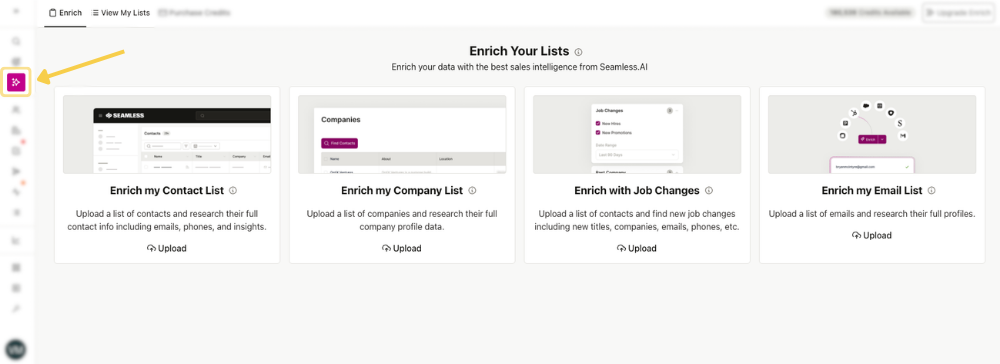
Each contact, company, or email record enriched uses 1 Credit. For example, uploading a list of 2,500 contacts to Enrich My Contact List would use 2,500 Credits.
You can access Data Enrichment from the left-hand navigation menu by selecting the Enrich icon.
To start, choose the enrichment type you want to run, then click Upload to open the upload window.
- Confirm the enrichment type, or change in the drop down window.
- Upload or drag and drop your .CSV or .XLSX file
- Name your enrichment list so it is easy to find later in View My Lists.
- Optional: Add enriched contacts or companies to a list or apply a tag to help keep records organized in My Contacts or My Companies.

Pro-Tip
A common reason uploads fail is incorrect or missing column headers in the file. If you receive an error during upload, check that your file includes the required headers for that enrichment type, or use one of the provided templates.
.png)
Viewing Enriched Lists
Once your enrichment is complete, you can find it in the View My Lists tab on the Data Enrichment page. Select View List to review the enriched profiles in Seamless.
From there, you can also manage the records further, including importing them to your CRM or downloading them as a new CSV file from the three-dot menu.
.png)
Enrich My Contact List
Use Enrich My Contact List to upload a list of contacts and research additional details such as email addresses, phone numbers, and other available insights. This is a helpful option when you have a bulk list of partial contact data and want to build out more complete records.
For example, this can be useful if you have a bulk list of contacts you met briefly at an event and only know their names and companies. Instead of searching manually, you can upload that information and use enrichment to uncover the contact details needed for a direct follow-up.
It can also help when you already have a working list but need to fill in missing information before starting outreach, recruiting, or list cleanup.
Required CSV Headers
To use Enrich My Contact List, your CSV file must include one of the following header combinations:
- Contact Name and Company Name
- LinkedIn Profile URL
- LinkedIn Sales Navigator URL
- LinkedIn Recruiter URL
Including one of these options gives Seamless the information needed to match and enrich the contacts in your file.
Enrich My Company List
Use Enrich My Company List to upload a list of companies and research additional company profile details. This can help you better understand the businesses you’re targeting and build a more complete picture before outreach, planning, or analysis.
For example, this is useful for market research when you want to learn more about a company’s size, structure, or overall profile. It can also help you better understand the types of companies in your market, identify patterns across target accounts, or gather insight into competitor customer bases.
Required CSV Headers
To use Enrich My Company List, your CSV file must include one of the following headers:
- Company Name
- Website
Enrich with Job Changes
Use Enrich with Job Changes to upload a list of contacts and identify whether they have changed roles or moved to a new company. This enrichment can also return updated details like current title, company, email, and phone information.
This is especially useful when you want to keep contact records current and act on changes that may create new opportunities.
For example, if a former prospect joins a new company, that move could create a warm path to restart the conversation. It can also help customer-facing teams stay aware of champion movement so they can reduce churn risk and maintain account coverage.
Common Use Cases
Generate new sales opportunities
Track when former prospects, blockers, or decision-makers change roles so you can re-engage accounts or reopen past opportunities.
Reduce churn risk
Know when a champion leaves an account so you can proactively build relationships with other stakeholders.
Win more deals with warm contacts
Reconnect with people who already know your company, product, or service when they move into new roles.
Required CSV Headers
To use Enrich with Job Changes, your CSV file must include:
- First Name
- Last Name
- Company Name
- Job Title is optional, but recommended for better matching accuracy.
View Your Job Changes List
After your Job Changes enrichment is complete, you can review the results in the Job Changes Contacts tab within My Contacts.
From there, you can view:
- Changes to a contact’s title
- Changes to a contact’s company
- The contact’s full profile
To import or download these contacts, go to My Contacts and apply the Job Changes List filter from the filter menu.
Job Changes Output Definitions
Here’s what each field means in the Job Changes results:
- Original Job Title: The contact’s job title from your uploaded file
- Original Company Name: The company name from your uploaded file
- Title: The contact’s current job title identified during enrichment
- Company: The contact’s current company identified during enrichment
- Job Change Identified: Indicates the type of change found, such as company change, title change, both, or no change
Enrich My Email List
Use Enrich My Email List to upload a list of business emails and research additional contact details tied to those records. This helps turn a basic email list into more complete contact profiles for outreach, segmentation, or follow-up.
For example, this is useful after collecting registrations from an event, webinar, or newsletter signup. If you only have email addresses, enrichment can help you build out the contact record with more information before taking the next step.
Required CSV Header
To use Enrich My Email List, your CSV file must include:
- Business Email
Including Business Email as a header gives Seamless the information needed to match and enrich the contacts in your file.
Common Uses for Data Enrichment
Seamless Data Enrichment can support a variety of teams and workflows by helping turn partial records into more complete contact profiles.
Sales: Keep your prospecting lists accurate and up to date. This helps ensure your email outreach and sales sequences are going to real people with stronger contact data.
Marketing: Enhance contact records when you only have limited information, such as a first name and email address from a newsletter signup. With richer contact data, you can support more targeted marketing efforts like direct mail, audience building, and paid social campaigns.
Recruiting: If you have a candidate’s name and company, Data Enrichment can help you find additional contact details like email addresses and phone numbers so you can reach out more effectively.
Real-World Applications
Data Enrichment is especially useful when you have some information about a contact, but not enough to take action. Here are a few common examples:
You have the job title and industry
If you know the industry you want to target, such as Healthcare, and the job titles you want to reach, such as CMOs, you can use Seamless to identify matching contacts and uncover their information.
You have the first name and company
If you already know a person’s first name and the company they work for, you can use Data Enrichment to help fill in the rest of the contact record.
You have the industry and company
If you know which companies and industries you want to target, but still need the right decision-makers and their contact details, Data Enrichment can help complete the list and move outreach forward.
