
News and Events Search Filter
Use the News and Events filter in the Seamless to narrow Contact Search and Company Search results by recent company activity, including acquisitions, partnerships, leadership changes, and more.
The News and Events filter helps you narrow search results based on recent company activity. It is available in search across the Seamless platform and in the Chrome Extension, making it easier to identify companies connected to relevant business events wherever you work.
What is the News and Events filter?
The News and Events filter allows you to refine your search results using recent company developments. This makes it easier to find contacts or companies associated with meaningful business activity, such as acquisitions, partnerships, leadership changes, and more.
You can apply this filter in:
- Contact Search
- Company Search

Event Types
Within the News and Events section, you can filter by the following event categories:
- Acquisition - Covers news related to mergers, acquisitions, or potential sale of a company. These events highlight when one organization acquires or plans to acquire another, signaling shifts in ownership, strategy, or market consolidation.
Example Headlines -- “20 Nov Exact Sciences to be bought by Illinois-based Abbott Laboratories”
- “Pizza Hut's parent Yum Brands may soon put it up for sale”
- Corporate Challenges - Includes legal disputes, regulatory scrutiny, or public controversies. These events surface risks or obstacles a company is facing that could impact operations, reputation, or compliance.
Example Headlines -- “SAP sues Celonis for patent infringement in Delaware.”
- “YouTube Faces Scrutiny Over Biometric Data Rules for Deepfake Detection Tool”
- Cost-Cutting - Focuses on initiatives to reduce expenses, such as layoffs, restructuring, or operational changes. These events often indicate shifts in financial strategy or efforts to improve profitability.
Example Headlines -- “P&G to Exit Pakistan, Shifts to Distributor Model”
- “Boeing to cut around 300 defense supply chain jobs”
- Expansion - Highlights company growth through new markets, product launches, hiring, or geographic expansion. These events signal momentum and opportunities tied to scaling operations.
Example Headlines -- “Xbox store update brings useful new sort options to console and PC”
- “TCS expands Latin America presence; to create 1,600 jobs
- Investment - Covers funding activity, capital investments, or large financial commitments. These events reflect where companies are allocating resources and betting on future growth.
Example Headlines -- “Private AI infra investments in India could double in FY26: Minister Vaishnaw”
- “AMD secures five-year AI chip supply deal with Meta worth up to $60bn”
- Leadership - Includes executive hires, promotions, or organizational leadership changes. These events can signal strategic direction shifts or internal restructuring at the leadership level.
Example Headlines -- “RSM UK appoints digital forensics head”
- “Citi names new Vietnam markets head”
- Partnership - Captures collaborations, contracts, and strategic alliances between organizations. These events highlight companies working together to deliver products, services, or innovations.
Example Headlines -- “IBM Secures Contract to Upgrade Electronic Shelf Labels for Defense Commissary Agency”
- “Cognizant to Modernize Daimler Truck Workplaces”
- Recognition - Highlights awards, rankings, or public acknowledgments of a company’s performance or achievements. These events reinforce brand credibility and market perception.
Example Headlines -- “Apple TV's 'Number One on the Call Sheet' wins a NAACP Image Award”
- “AT&T Named America's Best and Fastest Internet”

Date Range
You can also narrow results based on how recently the event occurred. Available date ranges include:
- Last 60 days
- Last 90 days
- Last 180 days
- Last year
Using both the event type and date range together can help you focus on the most relevant and timely opportunities.
Viewing News and Events in search results
After applying the News and Events filter, results will display as they normally do in Contact Search or Company Search. Users can view more information about the events in the News and Events.
The News and Events section will display:
- The type of event or news
- The date the event occurred
- A brief summary of the event
Note: If you do not see the News and Events column in your results, you may need to add it to your table layout. Select Edit Columns and add News and Events to your display layout.
News and Events in Table Layout
If you are viewing profiles on the Table Layout, you will see a summary of the event in the News and Events Column.
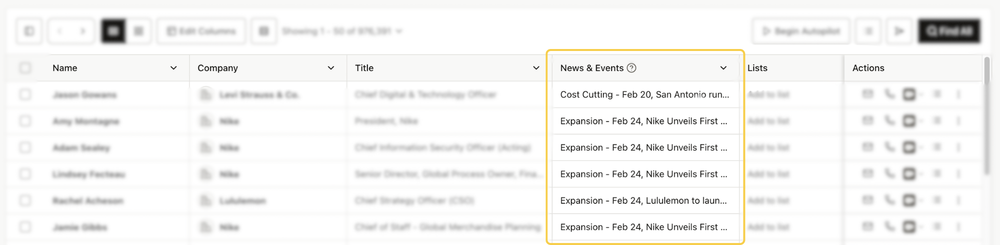
To view a futher description and breakdown of the event, hover over the desired event.

News and Events in Card Layout
The Card Layout will display a summary of the recent event and a link out to learn more.

Viewing News and Event in Flyout Profile
Keep track of events in the Contact or Company flyout profile as well. The News and Events page displays recent company news and links out to learn more!

